

What this does for you
- See at a glance whether the practice is growing, without building a spreadsheet.
- Spot which services and time slots clients want most, so you can plan your week around them.
- Keep an eye on money still owed to you.
Before you start
- Reports are built from your bookings and invoices. The more you use Bookings and Billings, the more useful this page becomes.
- Your plan. Reports & Analytics is included in the Standard plan.
The Reports & Analytics page
Click Reports & Analytics in the left-hand menu.
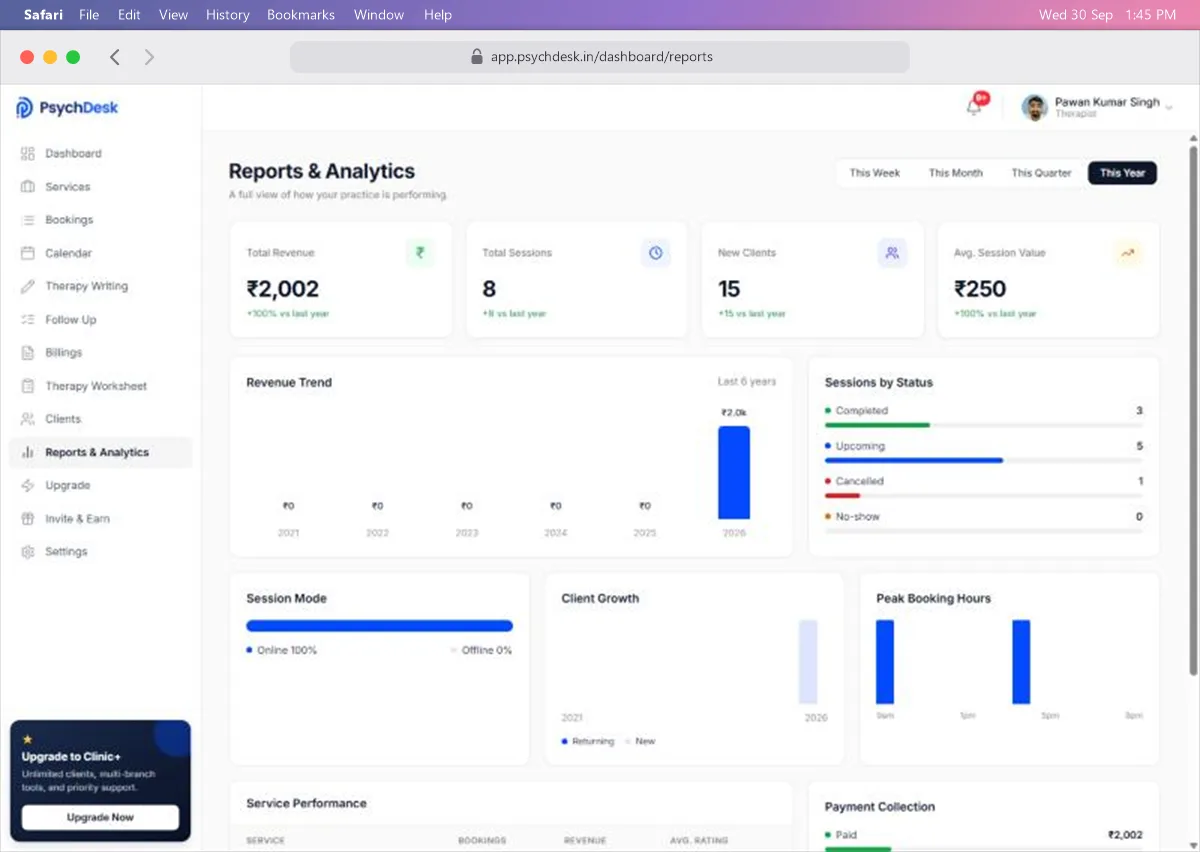
Choose the period
Use the buttons at the top right: This Week, This Month, This Quarter or This Year. Every card and chart on the page updates to that period.
This Month is selected when the page opens. Each summary card compares the period with the one before it, for example "vs last month" or "vs last year".
Summary cards
| Card | What it shows |
|---|---|
| Total Revenue | Money collected in the period |
| Total Sessions | Sessions in the period |
| New Clients | Clients added in the period |
| Avg. Session Value | Total revenue divided by total sessions |
A green figure under a card means it has gone up compared with the previous period.
Charts and tables
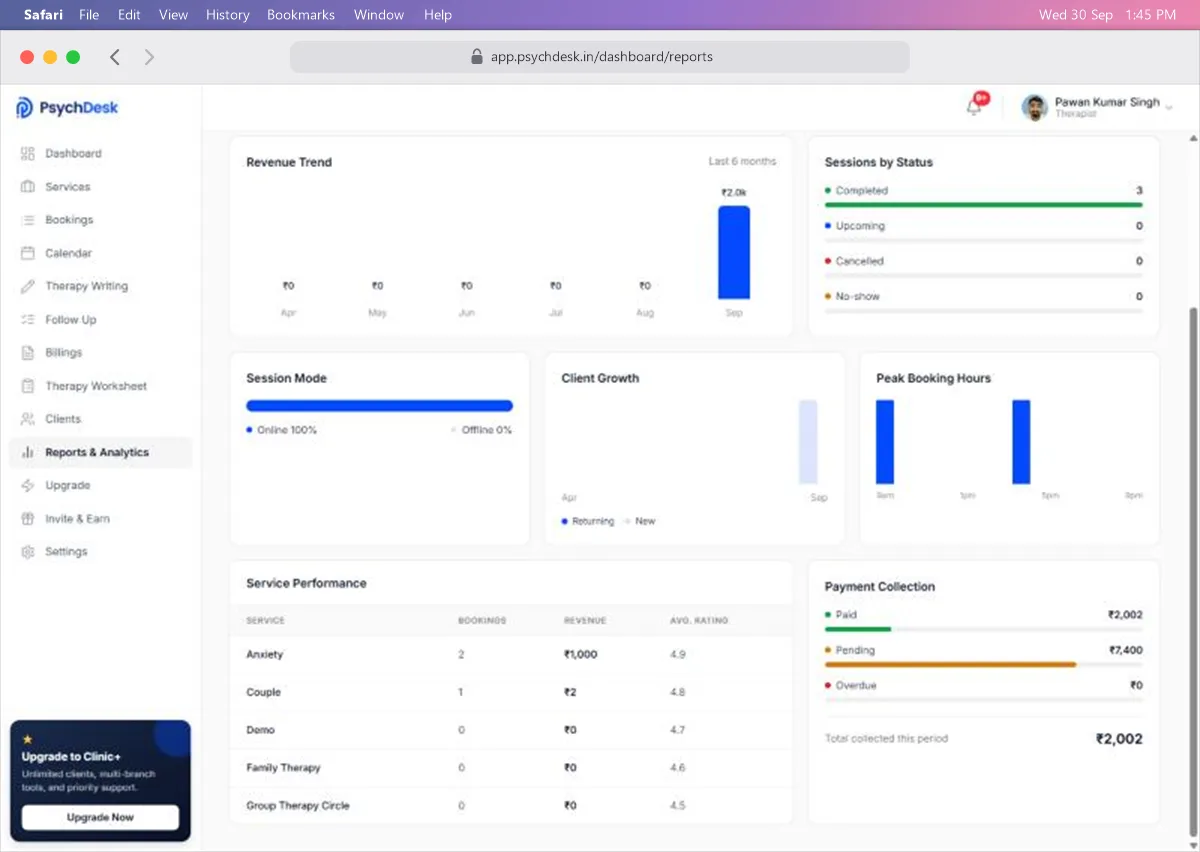
Revenue Trend. Money collected over the last six months, or the last six years when This Year is selected. Use it to see seasonal patterns, such as quieter months.
Sessions by Status. How many sessions were Completed, are Upcoming, were Cancelled, or were a No-show. A rising number of cancellations or no-shows is worth looking into.
Session Mode. The share of sessions held Online and Offline.
Client Growth. New clients compared with returning clients over time.
Peak Booking Hours. The times of day when sessions are booked most. Useful when deciding which hours to open in your availability.
Service Performance. For each service: number of bookings, revenue and average rating. Shows which services clients choose most.
Payment Collection. How much has been Paid, how much is Pending, and how much is Overdue, with the total collected in the period.
Questions this page helps you answer
| Question | Where to look |
|---|---|
| Am I earning more than last month? | Total Revenue with This Month selected |
| Which service should I promote? | Service Performance, comparing bookings and revenue |
| Should I offer more evening slots? | Peak Booking Hours |
| Are clients coming back? | Client Growth, returning versus new |
| How much am I still owed? | Payment Collection, Pending and Overdue |
| Are cancellations a problem? | Sessions by Status |
A monthly habit
On the first working day of each month:
- 1Select This Month and note Total Revenue and Total Sessions.
- 2Check Payment Collection and follow up anything Pending or Overdue from the Billings page.
- 3Look at Peak Booking Hours and adjust your availability if clients keep asking for times you do not offer.
Check it worked
- 1Note Total Sessions for This Month.
- 2Book a test session for this month.
- 3Reload Reports & Analytics and confirm the figure has gone up.
Common problems
| Problem | Likely cause | Fix |
|---|---|---|
| Everything shows zero | No bookings in the selected period | Choose a longer period, such as This Year |
| Revenue looks lower than expected | Revenue counts money collected, not unpaid invoices | Check Payment Collection for Pending amounts |
| A new service is missing from Service Performance | It has no bookings yet | It appears with zero bookings until it is booked |
| Figures do not match Billings | The two pages count different things | Billings Total Earnings includes unpaid invoices; this page's Total Revenue does not |
What to set up next
- Explore plans and what each includes: see the Upgrade guide.